A FiveM siren pack is a resource that streams custom siren sounds from your server, so every player hears the same wail, yelp, priority and rumbler tones without touching their own game files. You can install a server-side pack you have permission to use, or build your own from recordings with the FiveM siren pack creator, which zips the audio bank, the data files, a Lua example and a Z_ELS snippet for you.
This guide covers the difference between server-side and client-side packs, what a pack contains, how to build and install one, how to play the tones from Lua or Z_ELS, and what to check when the sirens stay silent.
Server-side vs client-side siren packs
Most searches for a siren pack end up at one of two very different things.
Server-side: a normal FiveM resource. The audio is streamed to players when they join, so everyone hears the same sirens and nobody has to install anything.
Client-side: replaces audio in a player's own game files. Only that player hears the new sounds, everyone else still hears stock GTA V sirens, and you cannot make players install it.
Server-side packs need a script or siren controller (Lua, Z_ELS and similar) to play the tones. Client-side packs simply swap the default sounds.
For a roleplay server, server-side is almost always what you want. Officers and civilians hear the same thing, and you control every tone from your resources folder.
What is inside a server-side siren pack
An audio bank: one or more .awc files holding the recorded tones.
Sound data: a .dat54.rel file that names each sound and groups them into a sound set the game can look up.
An fxmanifest.lua that lists those files and declares them with data_file entries so the game loads them.
Something that plays the tones: a Lua script, or a siren controller config such as Z_ELS that references the sound names.
Getting siren sounds you can use
Free siren pack downloads are common, but only use a pack whose author allows it on a server, and never reupload someone else's paid or locked work. The cleanest option is your own recordings or sounds you have a licence for, which you then turn into a pack yourself.
Typical tones to collect:
Wail: the slow rising and falling tone.
Yelp: the fast version for intersections.
Priority, phaser or hi-lo: secondary tones for traffic or variety.
Rumbler: the low-frequency tone that shakes cars ahead. Keep it as its own tone so your controller can give it its own button.
Air horn: a short, separate sound rather than a loop.
Before you build, trim each siren to a clean loop with no silence at the start or end, and bring the tones to a similar volume so switching from wail to yelp does not jump in loudness.
Build a siren pack with Rivo
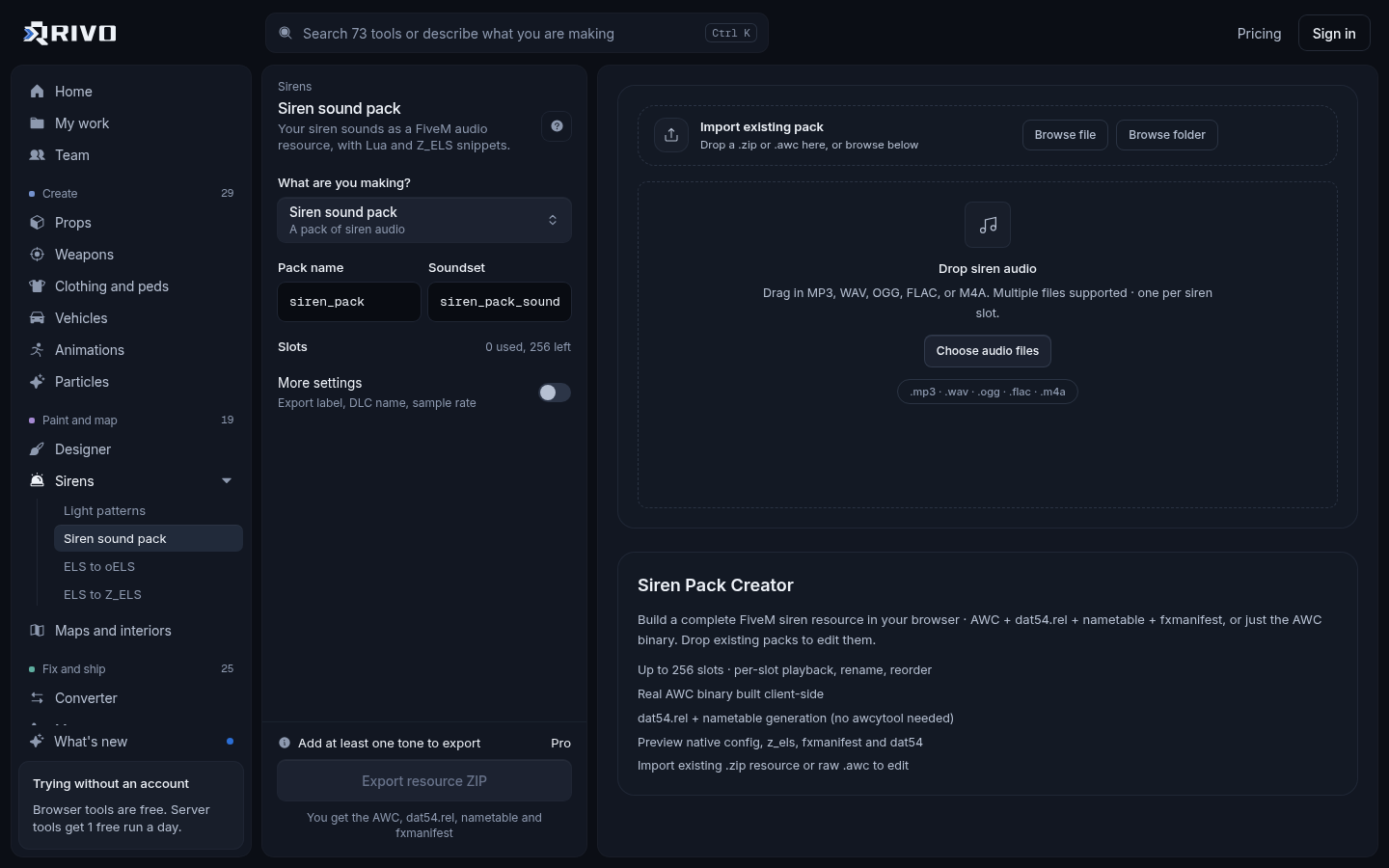
Open the siren pack creator and drop your siren sound files.
Name each tone (for example wail, yelp, priority, rumbler) and give the pack a name. Use short names without spaces, since you will type them into configs later.
Download the zip. It contains the audio bank, the data files, a Lua example and a Z_ELS snippet.
Keep the Lua example and Z_ELS snippet open. They hold the exact bank, sound and sound set names your scripts need.
How to install a siren pack in FiveM
Unzip the pack into your server's resources folder. Use a folder name with no spaces, such as mysirens.
Open fxmanifest.lua and confirm the audio and data files are listed under files and declared with data_file entries.
Add an ensure line to server.cfg, above the siren controller or script that uses it.
Restart the server, or run refresh and then ensure mysirens in the console.
Join, get in an emergency vehicle and test every tone.
A typical manifest for a streamed audio pack looks like this. Use the file and folder names from your own pack.
fx_version 'cerulean'
game 'gta5'

files {
    'audiodirectory/*.awc',
    'data/*.dat54.rel'
}

data_file 'AUDIO_WAVEPACK' 'audiodirectory'
data_file 'AUDIO_SOUNDDATA' 'data/mysirens_sounds.dat'Note that the AUDIO_SOUNDDATA line points at the .dat name without the 54.rel ending. That is the normal convention for these files. If you are unsure your manifest matches the folder, run it through the fxmanifest.lua checker, which flags missing files, wrong paths and undeclared data_files.
# server.cfg
ensure mysirens
ensure z_elsPlay the tones in game
With a Lua script
If you run your own siren script, you load the audio bank, mute the stock siren and play your sound on the vehicle. The included Lua example shows the real names for your pack. The shape is roughly this:
local veh = GetVehiclePedIsIn(PlayerPedId(), false)
local soundId = GetSoundId()

-- names come from your pack's Lua example
RequestScriptAudioBank('DLC_MYSIRENS\\MYSIRENS_ONE', false)
SetVehicleHasMutedSirens(veh, true)
PlaySoundFromEntity(soundId, 'MY_WAIL', veh, 'MY_SIRENS_SOUNDSET', false, 0)

-- when the siren turns off
StopSound(soundId)
ReleaseSoundId(soundId)With Z_ELS
If your fleet runs on Z_ELS, paste the Z_ELS snippet from the zip into your config so each tone maps to the right sound name. Our Z_ELS for FiveM guide walks through the setup. If your vehicles still use old ELS .xml configs, the ELS to Z_ELS converter turns each VCF into a Z_ELS vehicle .lua, and the ELS to oELS converter does the same for oELS.
Lights are a separate job
A siren pack only changes sound. Flash patterns live in carcols.meta. To design them on a 3D police car and export the siren settings, use the siren and light pattern editor. If two vehicle packs claim the same siren id, their lights break each other; the carcols ID fixer finds those clashes, renumbers them and rewrites carvariations to match.
Siren packs with gun sounds
Packs advertised with gun sounds are usually client-side audio replacements that swap weapon and siren audio in the player's game. Only that player hears them. A server-side siren pack covers sirens only. If you want a custom gunshot that everyone hears, build it into an addon weapon instead: the addon weapon creator lets you add your own shot sound to a weapon built on a GTA V gun.
Troubleshooting a silent or broken siren pack
No sound at all: check the console on start for errors, confirm the resource is ensured, and make sure the data_file lines match the real file and folder names.
Stock siren plays over yours: the default siren is not muted. Mute it in your script or check your controller's setting for custom sounds.
Wrong tone on a button: the sound name in your Lua or Z_ELS config does not match the pack. Copy names straight from the included example.
Works for you but not others: you probably installed a client-side pack. Switch to a streamed resource.
Siren works but lights are wrong: that is carcols.meta, not the sound pack. Check for duplicate siren ids.
Pack loads after the controller: move its ensure line above the siren controller in server.cfg.
To see the full feature overview before you start recording, read the siren pack creator page. Once your tones are in a pack and your manifest checks out, adding new sirens later is just a matter of rebuilding the pack and restarting the resource.